|
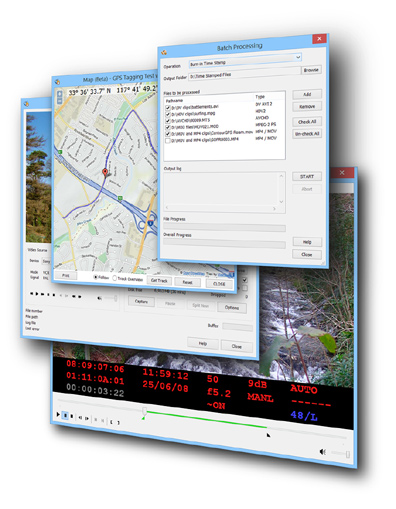
DVMP Pro is the most comprehensive and reliable method of time-stamping your camcorder video files. It extracts the
recording date and time (also known as datacode or datecode) and stamps it onto the visible area of each frame. See the original date and time of recording change in real-time and with frame accuracy. Choose the exact format of the date and time stamp, also the font, size, position and language. Import time-stamped files into your own video editing or DVD authoring software. Works with video files from many cameras, camcorders and smartphones - try the DEMO version with your own files. See table below for supported file types.
Play camera files and view the date and time changing in real-time - handy if you don't need a stamped file and just need to see the date and time immediately!
Also stamp or view other metadata information such as camera exposure settings or GPS location when the recording was made, changing in real-time. Exact info available will vary depending on camera/camcorder model - try the DEMO version with your own files.
See a GPS map of where the video was recorded (for cameras with inbuilt GPS units).
DVMP Pro is useful in the investigation, security, military and forensics sectors where you need to know reliably when and where video files were recorded, and when a particular recorded event happened.
The GPS features are also useful in geographic, marine and traffic surveying when you need to know where video was recorded to the nearest video frame.
See the list of features below - and for more detailed
info click the links on the left. Also there's masses of online help.
- Permanent time stamp on AVCHD, MOV, MP4, HDV, DV, MOD and Sony HDD video
- Time stamp the whole video file or just a single frame
- Time stamp a small section of a lengthy video file
- Change or adjust the stamped date and time
- Wide variety of date and time formats and languages
- Burnt-in timecode with frame accuracy
- Burn-in camera exposure settings and other metadata
- Burn-in Geotagging details (for some GPS-equipped cameras)
- Burn-in a custom text message or file name
- Burn-in a logo image or on-screen graphic
- Transparent background option - for importing to video editors as a
separate track.
- Output to MP4, AVI or WMV file
- Play AVCHD mts and m2ts files
- Play MOV & MP4 files from many cameras & smartphones
- Play HDV 1080 and 720 line m2t files
- Play Sony HDD (hard-drive) camcorder files
- Play standard definition MOD files
- Play standard DV AVI files, plus Canopus DV files, Raw DV files
(.dv), DVCPRO25 and DVCAM files
- Discover when AVCHD, MP4, MOV, HDV, MOD and Sony HDD files were recorded
- Adjust date and time (when camera settings were wrong)
- See date and time for every frame
- See exact timecode of every frame
- See changing exposure settings - shutter speed, f-stop, gain, white
balance etc
- Frame-step backwards or forwards through AVCHD, MP4, MOV, HDV, MOD and Sony HDD files
- Useful for video forensics and investigation, and training.
- Fix incorrect timecode or recording date/time
- Change between drop and non-drop timecode
- Add or change User Bits
- Set or clear widescreen flag
- Archive AVCHD, MOV, MP4, HDV, DV, MOD and Sony HDD metadata to CSV text file
- Avoid loss of metadata when converting or recompressing to other video file
formats
- Import CSV file to spreadsheet, database, scripts or utilities
- Export AVCHD, MOV, MP4, HDV, DV, MOD and Sony HDD metadata to DVD subtitle file (.srt)
- Helps create switchable DVD subtitles, displaying date, time and camera
exposure settings (requires compatible DVD Authoring program)
- See exactly when each file was recorded
- Supports AVCHD, MOV, MP4, HDV, DV, MOD and Sony HDD files
- Convert to/from DV AVI Type 1 and 2 and Raw DV (.dv)
- Extract audio of DV and HDV files to WAV file
- Extract audio of AVCHD and Sony HDD/DVD files to AC3 file
- Extract audio of MOV and MP4 files
|
|
- Display latitude, longitude, speed & direction where clips were shot
- See geographical location of any point when the camera is moving
- Display Google map showing exact location with one CTRL keypress
- Interactive moving map that follows the camera position (beta add-on).
- Export to GPX file format, then import to Google Earth to view the camera
location and track its movement
- Overlay geographical coordinates onto video frames
- Geotagging is only supported for compatible AVCHD cameras with built-in
GPS units (also supported in standard definition mode)
- GoPro Hero Black, Contour+ and iPhone files also supported
- Process many AVCHD, MOV, MP4, HDV, DV, Sony HDD/DVD and MOD files at once
- Capture DV from tape, splitting scenes on-the-fly to separate AVI files
- Choice of splitting rules
- Capture live from camera
- Direct capture to hard drive with GBs of storage
- Slave to camera feature
|
|
Supported File Types
DVMP Pro time-stamps, plays and displays the metadata for AVCHD, MOV, MP4, HDV, DV, MOD and Sony HDD camcorder video files.
See "Supported File Types"
for more details of these file types.
Files can also be time-stamped using the Burn-in Time Stamp tool.
All files must be "camera-original" (i.e. files copied directly from the camera without any further processing). The vast majority of video processing software does not understand the camera metadata or completely ignores it. If the file has been though any form of processing, filtering or transcoding software, then the metadata will have been thrown away and will contain NO date, time or any other metadata. This is why only camera-original files are supported by DVMP Pro.
DVMP Pro's processing tools are available from the Tools menu,
or in the Batch Processor where lots of files can be processed as a batch. The Tools and their supported file types are summarised in the following tables.
Tools available from the Tools Menu
Batch Processing Tools
System Requirements
Playing and processing some file types requires a lot more more
processing power than others. Therefore there are 3 broad levels of system
requirement for playing files. A slightly lower spec can be used for time-stamping
and other tools which will just take longer to complete.
For AVCHD playback:
- 3GHz, Quad Core
- 4GB RAM
- Windows 10, Windows 8/8.1,
or Windows 7
- DirectX 9
|
|
For HDV, Sony HDD/DVD and MOD playback:
- Core 2 Duo, 2GHz, or better.
- 4GB RAM
- Windows 10, Windows 8/8.1,
or Windows 7
- DirectX 9
|
|
For DV playback:
- Intel Pentium 4 / AMD Athlon 1.2GHz, or better.
- 4GB RAM
- Windows 10, Windows 8/8.1,
or Windows 7
- DirectX 9
|
MOV and MP4 files may contain video in many different formats and resolutions, so requirements may vary between the two higher levels.
DVMP Pro is only available for Microsoft Windows. It does not work on Mac operating systems.
Windows 10, 8.1, 8 and 7 are supported. Earlier versions of Windows such as Vista and XP are not supported in version 7 of DVMP Pro.
Try the DEMO version to check its performance with your own video files before buying.
Download our 14 day demo version - this has almost all of the functionality of the
full version, but all output files are watermarked.
©2003-2020 Code Station Ltd. All rights reserved.
|